Learn more here about One Step’s chosen payment processing partner PaySimple and our partnership. Setting up your One Step account for credit card and ACH processing is quick and easy, but there are a few things to know as you navigate through accepting digital payments from your residents.
In this guide, we'll be walking through the PaySimple application and going over any tips or possible questions. Here is the link to the application to get started!
Please make sure that you enter everything truthfully and completely otherwise the application will get rejected by PaySimple.
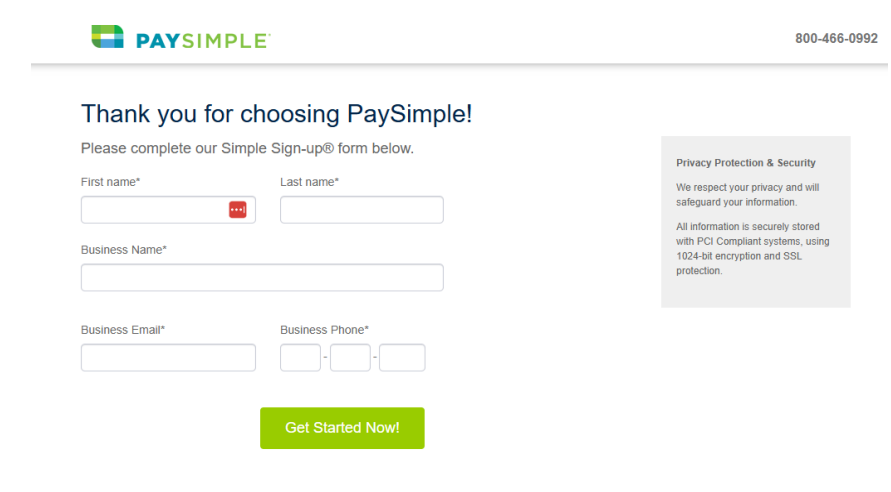
First Page
The first part of the application will ask you for your first name and last name.
For business name, please only enter a business name if you have properly registered the business with your state and you have an EIN (tax ID number).
If you don’t have these, do not enter a business name, just enter your personal name.
Do not make up a business name as PaySimple will verify if your business is registered and if it isn't, your application will get rejected.
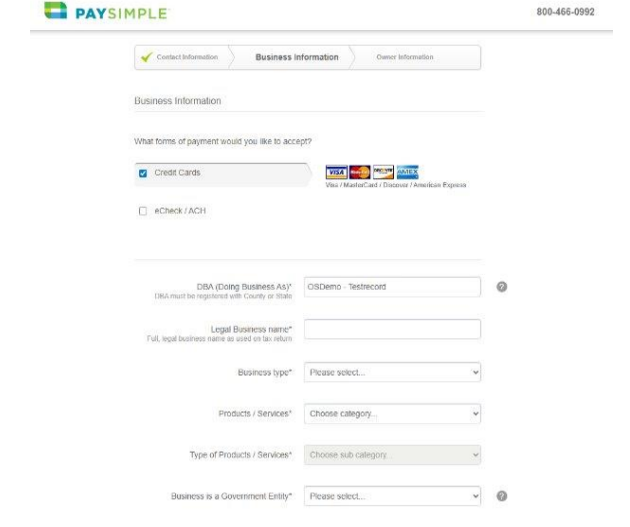
Business Information
If you accept both credit card and ACH from clients, select both so PaySimple can set you up on both
For DBA and full business name enter your business name. Please only enter a business name if you have properly registered the business with your state and if you have an EIN (tax ID number). If you don’t have these, do not enter a business name, just enter your personal name. Do not make up a business name as PaySimple will verify if your business is registered and if it isn't, your application will get rejected. If you don’t have a business registered, use your personal name and select Sole Proprietorship as the business type.
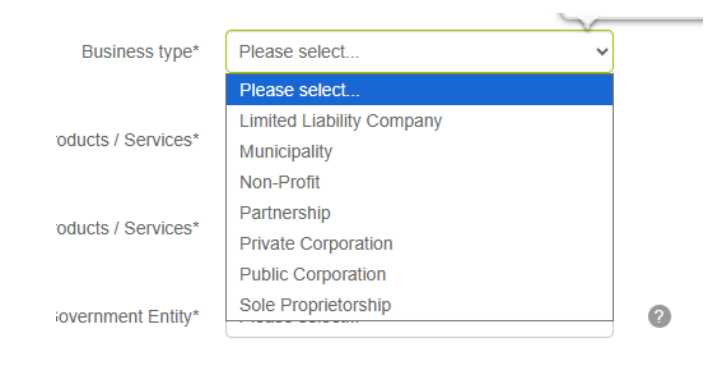
Business Type
Business Type refers to how the business is registered with the IRS (not the state)
Please do NOT select non-profit unless you have 501c proof as if you aren’t able to provide this PaySimple will reject your application
Most common Non-Profits are Private Corporations with the IRS and Nonprofit with the State, "Sole Proprietorship" should be selected if you do not have a business or contractor license
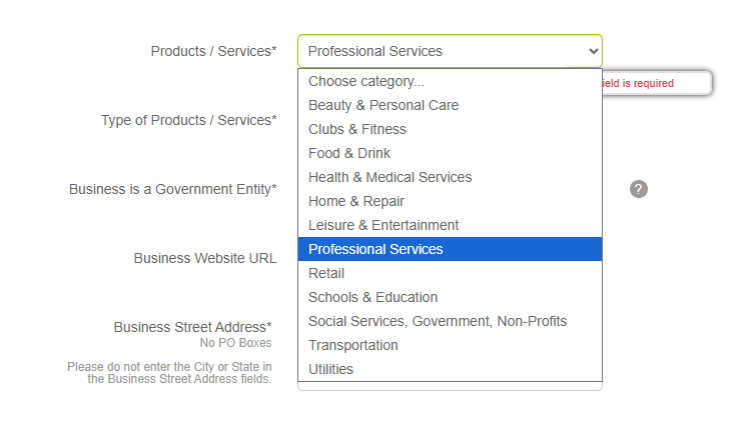
Product/Services
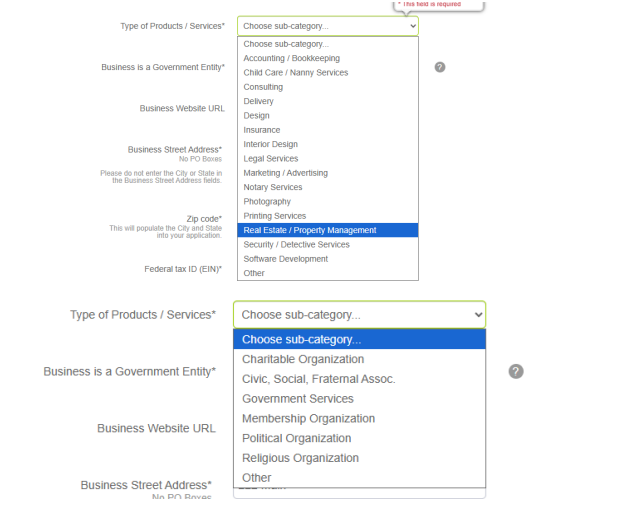
Please select Professional Services
Type of Product/Services
Most Sober Homes will select Real Estate/Property Management
Tax-exempt businesses can select the subcategory that best applies
Business Information (cont.)
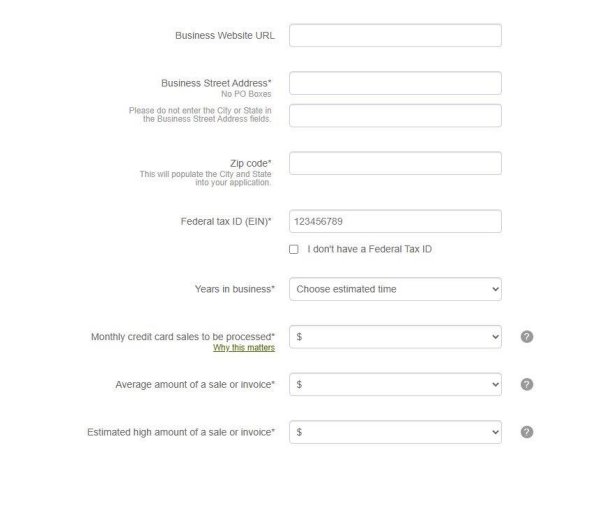
A business website is preferred
Facebook, Instagram, Yelp, Yellow Pages can also be used
The business address needs to be the sober home. If you do not want mail sent to this address, your Account Executive can help you set up a different billing address.
Federal Tax ID/EIN - PaySimple will reference IRS SS-4 or 147-C document to assure accuracy. If you don’t have an EIN, you can enter your social security number only if you selected Sole Proprietorship as the business type
Years in Business refers to date registered with IRS or State
Processing Volume - Please estimate the monthly based on actuals now, do not provide forecasted annual - PaySimple will reject the application if your estimate is too far off of what you actually are making currently. If your organization is new, you can forecast the number of credit card payments you believe you will collect in the next 90 days. This is credit card only, not total revenue.
Bank Details
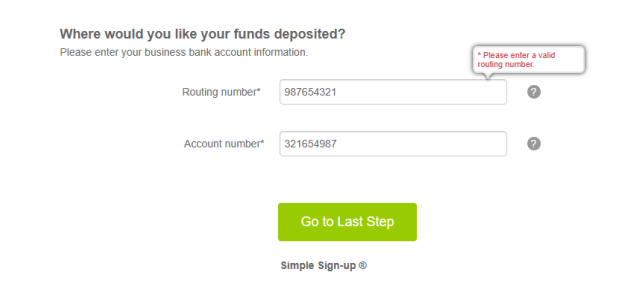
Bank account should be a business checking account (unless the business is operated as a Sole Proprietorship)
Routing number can be found on the bank's website or checks
Banks will sometimes have a different routing number for "wire transfers". Only use a check routing number, not wire transfer routing number.
Online banks are rarely accepted by PaySimple, please use a bank with a physical address
Business Representative
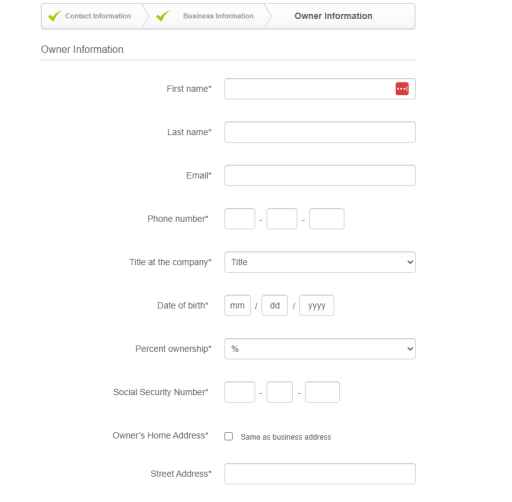
Enter your full legal name as shown on SSN card
Personal email that is checked daily or weekly at a minimum - avoid general business inboxes
Personal cell number that ties back to the owner (not general business line)
Date of birth – will be checked for security
We are required to collect this information for all owners with a 25% or more stake in the business
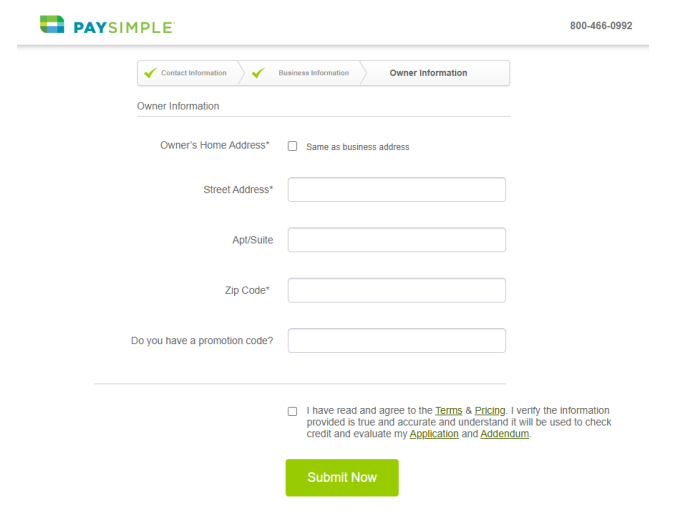
Home address – not business address
Full SSN required for identity verification to protect against fraud and soft credit check (no impact on credit score)
Home address also needed for identity verification and security
Review and Submit!
What To Expect After Submitting Your Application
Once you've submitted, the application will be submitted to the processor and will take 24-48 hours for review for review. If additional items are needed, a PaySimple Sale Account Executive will reach out with questions or document requests. PaySimple might require the additional documents depending on different factors:
Recent bank and/or processing statements
Business license or IRS SS4
ID (Driver's license)
Contract or invoice (only if they don't have a website or social media)
Lease or utility bill for the business address
Be on the lookout for messages from the following organizations:
Forte
Payimple
WorldPay
If you have any questions regarding your PaySimple account please reach out to Customer Care (1-800-466-0992 Option 2 or care@paysimple.com)
You may also submit a support ticket by visiting their site here.
PCI Compliance and Opting Out of Paper Statements
Once you’ve been notified that you’re ready to process on One Step, you'll want to reach out to care@paysimple.com to opt out of paper statements and turn on chargeback notifications.
Paper statements will cost $5 to receive. If you don't opt out of paper statements you'll see this $5 charge each month.
PCI Compliance with Worldpay
Be on the lookout for a survey from PaySimple. This is called the PCI Compliance Survey. This survey will be sent via email and it must be completed in a timely manner. If you do not complete this 5 minute survey, you will see a charge of $90.00 for each month it has not been done. The survey is a PaySimple Requirement for security reasons. PCI Compliance is industry regulated and is for credit card processing only. For more FAQ's see this article here about PCI Compliance.
Transaction Fees
Transaction fees are as follows:
3.2% + $0.37 for Credit Card
0.25% + $0.69 for ACH
Monthly $5.95 for PCI Program Fee
If you have any questions regarding your PaySimple account please reach out to Customer Care (1-800-466-0992 Option 2 or care@paysimple.com) You may also submit a support ticket by visiting their site here.
If you’re looking for more information on how the payments feature inside One Step works, take a look at the guides below! Or give us a call at 912.455.3639
Was this article helpful?
That’s Great!
Thank you for your feedback
Sorry! We couldn't be helpful
Thank you for your feedback
Feedback sent
We appreciate your effort and will try to fix the article